
Guide
用 VPS to VPN 安装 3X-UI Sanaei
Black Fox Group 开发 VPS to VPN。在 Windows 或 Android 打开程序,用 SSH 连接 VPS,无需输入 Linux 命令即可安装 3X-UI Sanaei。
Get a clean Ubuntu 22 or 24 VPS first. You need the IP, SSH username, password, and port. Two GB RAM, two CPU cores, and 20 GB disk is the usual minimum.
Download the Windows zip or the Android apk from the official download page on foxnext.net. Install the program, then open it.
- Open Center Server Setup and save the VPS login. Do not leave spaces in IP, user, password, or port.
- Use SSH Connect. Wait until the connection mark is on. If it fails, fix SSH before you continue.
- Run Full Deploy. Watch the log. When it shows Successful, the panel is on the server.
- Open Panel Login Info. Copy the panel URL, username, and password. Paste the URL in a browser and sign in.
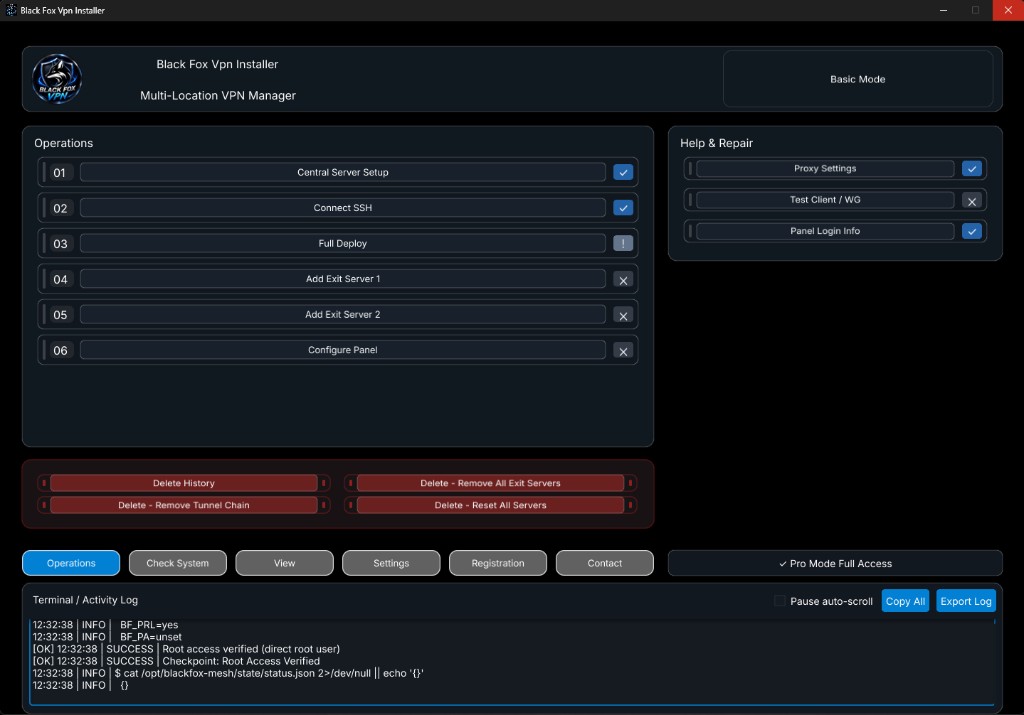
On Android, turn the phone VPN off while you set the center server, connect SSH, and run Full Deploy. On Windows the program handles that itself.
If you use Basic mode, add Exit servers after the panel is up. Save Exit 1, wait for Successful, then do Exit 2 the same way. On Android keep the phone VPN on when you add exit servers.
Official files: VPS to VPN-Setup.zip, VPS to VPN-Android.apk, and Black-Fox-Config-Builder.apk. Take them only from foxnext.net.
完整安装 · 手动或自动 · Full Deploy · 错误 · 教程 · 下载
Black Fox Group 开发 VPS to VPN。在 Windows 或 Android 打开程序,用 SSH 连接 VPS,无需输入 Linux 命令即可安装 3X-UI Sanaei。