
Guide
Full Deploy on Ubuntu
Full Deploy is the button in VPS to VPN that installs the panel and Xray on a fresh Ubuntu 22 or 24 VPS after SSH is connected.
Pick Ubuntu 22 or 24 when you buy the VPS. Other images often fail early. Keep at least 2 GB RAM, 2 cores, and 20 GB disk.
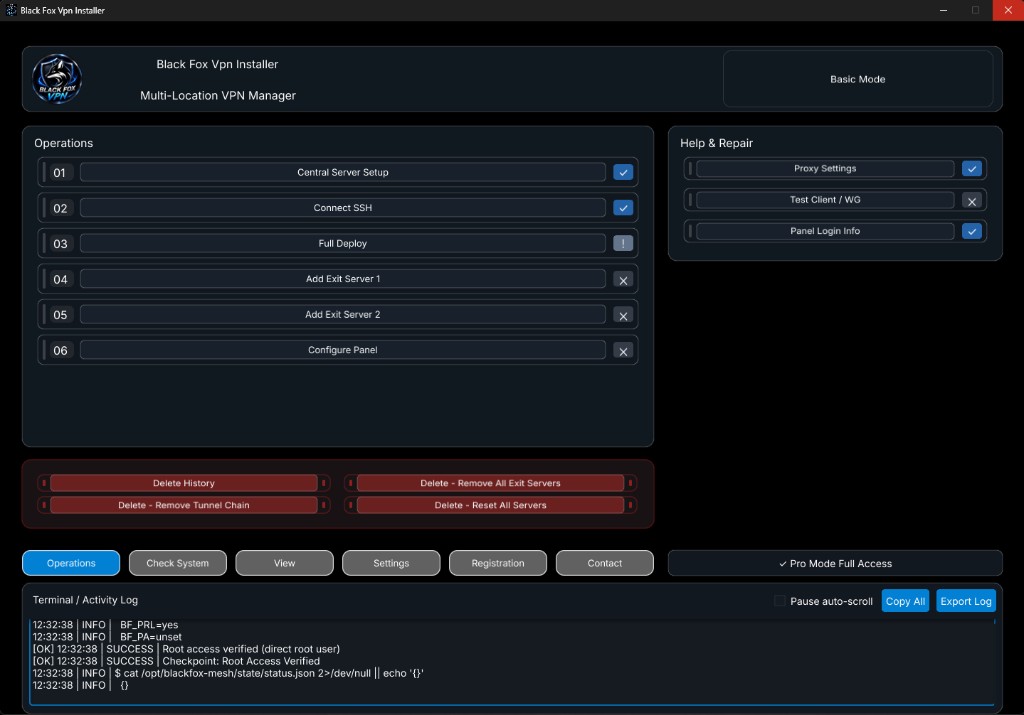
Save the center server, connect SSH, then press Full Deploy once. Leave the program open until the log says Successful. Do not start a second deploy on the same box while the first one is running.
After that, open Panel Login Info and sign in to 3X-UI Sanaei. Then add exit servers if you use Basic or Pro.
If deploy stops, check disk space, root or sudo access, and SSH stability. Details are in the errors page.
Volle Installation · Manuell oder auto · Full Deploy · Fehler · Tutorials · Download
Full Deploy is the button in VPS to VPN that installs the panel and Xray on a fresh Ubuntu 22 or 24 VPS after SSH is connected.